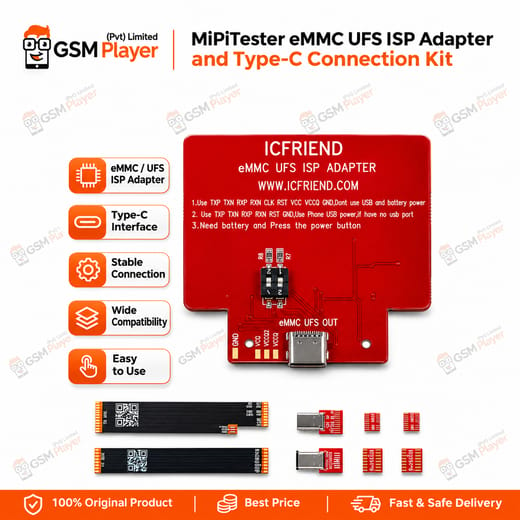
MiPiTester eMMC UFS ISP Adapter and Type-C Connection Kit for ISP Storage Repair .The MiPiTester eMMC UFS ISP Adapter and Type-C Connection Kit gives your MiPi Tester box a direct route to the storage chip through ISP points on the board. A dead phone often lands on your bench with customer data inside, and you need access before you think about chip-off. This kit lets you solder a few pads, connect, and read or write from your repair bench. If you search for the price in Pakistan, you will find it costs far less than the time you lose on a failed IC change karna job.
Where This Kit Fits in Your Repair Workflow .You use this kit at the storage stage of the repair. It serves phones with a hardware fault in the flash area, a corrupted partition, or a software marna job that no longer works over USB. You probe the board, find the ISP pinout, solder your jumper wires, and connect through the adapter. Your MiPi Tester software then talks to the eMMC or UFS chip directly.
This beats the chip-off route in many cases. Heating a board to remove storage risks neighbouring components, and one bad reball turns a repair into a scrapped motherboard. ISP keeps the chip on the PCB, so your hot air station stays cold for this job. You still keep a UFS socket adapter and hot air equipment on hand for cases where the ISP points fail or the chip itself is damaged.
Working With eMMC and UFS ISP Pinouts .The adapter serves devices that expose ISP pinouts on either eMMC or UFS storage. You match the pinout diagram to your board, solder carefully, and verify each connection with your multimeter before you power up. A weak jumper lagana causes most failed reads, so take your time and use a microscope for fine pads.
Once you connect, you read the user data, write it back, or repair the partition layout, depending on what your software supports. Technicians commonly use this route for phones that hang on logo, loop in boot, or stay dead after a bad flash. You also reach FRP lock and pattern unlock cases when the repair requires direct storage access, as long as your software handles that device.
Pairing It With Your MiPi Tester Box .This adapter is built for MiPi Tester boxes. The kit pairs with the MiPi Pro, MiPi Plus, MINI, and Gear 2 lines, and you confirm the exact adapter revision against your box before you order. If you run an older box, check the matching ISP adapter version first. Buying the wrong revision wastes your money and your time.
Think of this kit as one piece of a larger storage workflow. For chip-off jobs you still need UFS BGA153, BGA254, and BGA297 sockets, plus an eMMC socket set. If you want an upgrade path, a MiPi Pro with the full socket set covers both ISP and socket work on one bench. Keep a reliable hot air station and a microscope nearby, because ISP soldering rewards steady hands and good magnification.
Shop owners who handle storage repairs every week get the most from this kit. A single recovered phone often pays for the adapter, and the customer’s data stays intact.
Key Features
Direct ISP access to eMMC and UFS storage on supported boards
Built for MiPi Tester box workflows
Reads and writes user data without removing the storage chip
Cuts the need for hot air removal on many storage jobs
Suits dead phone, boot loop issue, and hang on logo cases
Reduces pad-lifting and reballing risk
Fits alongside UFS BGA socket adapters in a full storage workflow
Helps shops handle data recovery jobs in-house
Specifications
Brand Entity MiPiTester
Product Entity MiPiTester eMMC UFS ISP Adapter and Type-C Connection Kit
Technology Entity ISP (In-System Programming), eMMC, UFS
Compatible Device Entities Devices with eMMC or UFS ISP pinouts; MiPi Tester boxes (MiPi Pro, MiPi Plus, MINI, Gear 2)
Repair Process Entity ISP read/write, user data recovery, dead-after-flash repair
Industry Entity Mobile repair industry, PCB repair
Compatible Devices
Mobile devices that expose eMMC ISP pinouts
Mobile devices that expose UFS ISP pinouts
MiPi Tester boxes, including MiPi Pro, MiPi Plus, MINI, and Gear 2 (confirm adapter revision for your box)
Common Repair Uses
Recovering user data from a dead phone through ISP
Repairing a phone that stays dead after flash
Fixing boot loop and hang on logo faults caused by storage corruption
Reading and writing eMMC storage without chip-off
Reading and writing UFS storage without chip-off
Handling storage faults where USB flashing no longer connects